
Swoopa
Market Sourcing Solutions LTD PTYBusiness
3.852.00 Reviews
- Version
- 1.27.21
- Installs
- 50.00K
- Age Rating
- Everyone
Screenshots


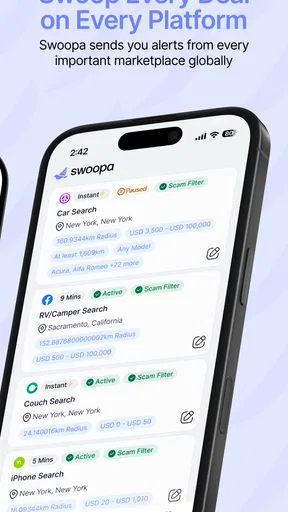
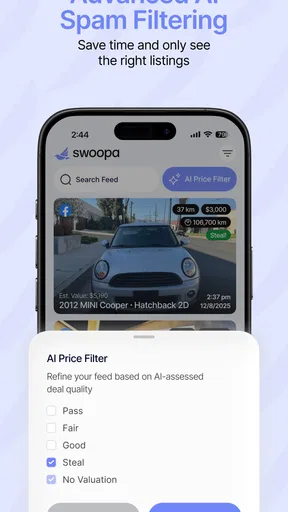


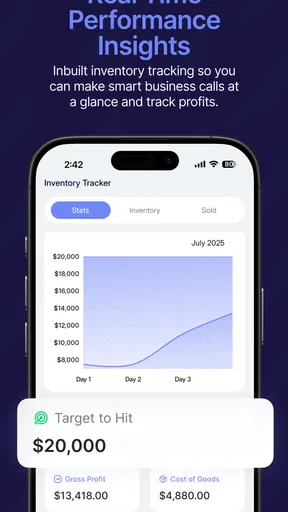

Our Review of Swoopa
 Analysis by Appyee
Ever stumbled upon an app that completely transforms the way you approach your daily tasks? Well, let me introduce you to Swoopa. This app has been making waves in the tech world, and I decided it was high time to see what all the fuss was about. Let me take you on a journey through my experience with it.
First Impressions: A Sleek Interface
As soon as I launched Swoopa, I was greeted with a modern and user-friendly interface. The design is clean, with intuitive navigation that even a tech newbie would appreciate. It feels like the developers really took the time to ensure everything is in its right place. No clutter, no unnecessary buttons—just a straightforward app that does what it promises.
Getting Started: Easy Peasy
Setting up the app was a breeze. Within minutes, I was up and running, diving into the features that Swoopa offers. The onboarding process is smooth, with helpful prompts guiding you every step of the way. It’s clear that user experience was a top priority during development.
One thing I appreciated was the personalization options. You can tweak settings to tailor the app to your preferences, which adds a nice touch of customization for those who like things just so.
Features That Stand Out
Now, let's talk features. Swoopa offers a range of functions designed to streamline your day-to-day activities. From task management to integrating with other apps, it’s like having a personal assistant in your pocket.
- Task Manager: Organize your to-do list with ease. The task manager is intuitive, allowing you to set deadlines, prioritize tasks, and even categorize them by color.
- App Integration: Seamlessly connect with other popular apps. Whether it's syncing with your calendar or pulling in data from your email, Swoopa makes it effortless.
- Notifications: Never miss a deadline with customizable notifications. Choose when and how you want to be alerted.
Performance and Reliability
In terms of performance, Swoopa runs like a dream. It’s fast and responsive, with no noticeable lags or crashes during my time with it. This reliability is crucial, especially if you plan on using the app for important tasks.
I tested the app on both Android and iOS devices, and it performed consistently well on both platforms. The cross-platform compatibility is a huge plus for those who switch between devices.
Final Thoughts: Worth the Download?
So, is Swoopa worth adding to your app collection? Absolutely. It’s a versatile tool that can enhance productivity, whether you're managing work projects or just trying to keep your personal life in order. The combination of a sleek interface, powerful features, and reliable performance makes it a standout choice.
If you’re looking for an app that can help you stay organized and efficient, give Swoopa a try. It’s a small investment of space on your device that can lead to big improvements in how you manage your tasks. Trust me, once you start using it, you’ll wonder how you ever got by without it.
Verdict
Strengths of Swoopa
- User-friendly interface for easy navigation.
- Wide variety of customization options.
- Seamless integration with social media.
- Offers real-time notifications.
- Lightweight and fast performance.
Limitations of Swoopa
- Limited offline functionality.
- Occasional ads can be intrusive.
- Requires constant internet connection.
- Some features locked behind paywall.
- Notifications can be overwhelming.
Similar Picks in This Category
View All
LinkedIn: Community & Network
LinkedIn3.8

Zoom Workplace
zoom.com4.1

Microsoft Teams
Microsoft Corporation4.6

Meta Business Suite
Meta Platforms, Inc.4.6

Webex Meetings
Cisco Systems, Inc.4.5

TeamViewer Remote Control
TeamViewer4.4
Frequently Asked Questions
What is Swoopa and what does it offer?
Swoopa is a dynamic app designed to enhance productivity by integrating task management, calendar scheduling, and note-taking features in one platform. It offers seamless synchronization across devices, ensuring you have access to your tasks and notes anytime, anywhere. The app is ideal for individuals looking to streamline their daily routines and improve efficiency.
Is Swoopa available on both Android and iOS devices?
Yes, Swoopa is available for download on both Android and iOS platforms. Users can easily find it on the Google Play Store and the Apple App Store. This cross-platform availability ensures that users can enjoy the app's features regardless of their device preference, facilitating a broader reach and user base.
Does Swoopa offer offline functionality?
Swoopa provides robust offline functionality, allowing users to access and edit their tasks and notes without an internet connection. Once a connection is restored, the app automatically syncs changes across all devices. This feature is particularly beneficial for users who frequently travel or work in areas with limited connectivity.
Is there a cost associated with using Swoopa?
Swoopa offers a free version with basic features that cater to general productivity needs. For users requiring more advanced features, such as enhanced collaboration tools and additional storage, Swoopa offers a premium subscription model. This tiered pricing structure allows users to choose a plan that best fits their needs.
How does Swoopa ensure user data privacy and security?
Swoopa prioritizes user data privacy and security by implementing robust encryption protocols and regular security updates. The app complies with international data protection regulations, ensuring that user information is safeguarded against unauthorized access. Users can also set up two-factor authentication for an additional layer of security.
